Showing posts with label Static Page. Show all posts

Thursday, August 18, 2016

How To Add A Static Page To Blogger

You can add a static page to your blog with things like the week's homework or things that you want easy access to.

You can also make it a like to a website or extra links for learners.

It will stay in one place always be easily accessible.

To add a page go to your Settings and then layout- add a gadget.


Look for the page gadget and add it by clicking on the add sign.


Decide what you want of the page and where it goes.


Now go back to your overview page and select Pages to make a new page.


Here is how it might look.


Read More

Monday, August 15, 2016

Create Blogger Static Home Page

There are different way to configure Blogger Static Page , in this article am going to show you some step you will be using on configuring the page.

Adding the Static Home Page
The first step is to simply create a static page in Blogger called something like 'Home Page' from the Blogger Pages menu item. Don't call it 'Home' yet because we're going to alter the home link later. When you click on the 'Pages' left menu item in the Blogger editor main menu you'll see that there is already a 'Home' link on the screen. Ignore that for now--just go up to the 'New Page' drop down box and select the 'Blank page' option:


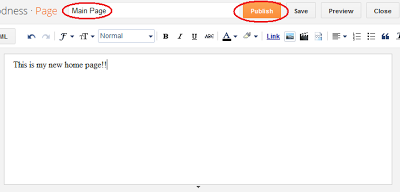
You'll now be in the Page editor which looks a lot like the Blogger Post editor. At the top enter a page name such as 'Home Page' or 'Main Page' for now and some default text - we'll alter it later. Just go ahead and press 'Publish':


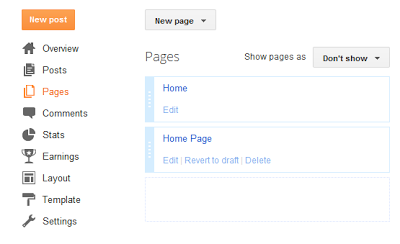
You should now see two pages in your list; 'Home' and 'Home Page' like so:


Now that you've created a static page, the next steps are are a bit tricky since you need to make sure your static page becomes 'Home' and the old Home link is hidden especially if you want to use menus.

Redirecting the Blogger Home Page to a Static Page

Read More