Showing posts with label CSS Code. Show all posts

Friday, May 14, 2021

How to add Css/Jquery fixed horizontal menu to blogger blog

This navigation bar gets semi-transparent when you scroll down the page and is slightly showing up by fading out and becoming almost transparent. When the user hovers over it, the menu becomes opaque again.

Inside of the navigation there are some links, a search input and a top and bottom button that allows the user to navigate to the top or bottom of the page.


Let's start adding it...
Read More

Saturday, April 24, 2021

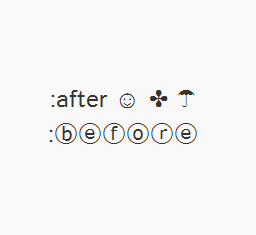
How to Use Character Entities in CSS, HTML and JavaScript

 Sometimes, when using scripts, we must write special characters like accents by using a special set of codes called character entities, however these don't always look good or we get a question mark or other strange symbols. Usually, this is solved if the character encoding is done right but the logic may not always work.


Use Charater Entries in CSS,HTML,JavaScript
In Blogger, special characters most of the time appear correctly, but when it is about other services, like external files, things can get complicated.
Read More

Friday, April 23, 2021

Add CSS code To Blogger using Template Designer

 If you are having difficulties adding the CSS codes in a Blogger template, here's a short guide that will show you a more practical and fast way to add CSS (Cascading Style Sheets) so that it will be easier for you to customize your blog.


Some readers have complained that when they had to add the CSS codes to install some feature in Blogger, they found it difficult to locate the ]]></b:skin> tag. So, I decided to make this quick tutorial to show you another way of adding the CSS without having to access the Blogger HTML editor.


Read More

Saturday, April 17, 2021

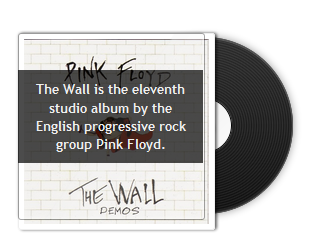
Create CSS3 Image Hover Effect with Animated Vinyl Record

 Here is an amazing CSS image effect to reveal more information on your images with a really cool CSS3 hover animation. This is just perfect for blogs dedicated to music or if you just want to show off the music that you love.

what we will do in this tutorial is to take an image for our album cover, add some fancy CSS3 transitions and transforms that, on hover, will slide out a pure-CSS vinyl record behind it. Finally, we will add some basic HTML to our post or page where we need to apply this amazing effect.

Read More

Friday, August 19, 2016

How to change post font size, color, style on blogger post with css

You can customize post body font in any expect like font, size, color, font family. First, you should know little bit knowledge about html code for post body and then we'll customize it according to our own taste.

Step1: Go to Layout and Edit HTML and find this code

Step2: search for this code ]]></b:skin>

Step3: now paste below code just above ]]></b:skin>
.entry-content, .entry-more { font-family: georgia;  font-size: 15px;color: #000;}
Step4: Now it is done and save your template

Note:- Change above (size, family, color) with your choice
Read More

How To Edit HTML Code

What I quite often do is make the Blogger video larger so that it is easier to see without having to go full screen. To do that I upload the video and then click on the html tab of the new post. You will see some html code as below. I then change the height and width to suit.

I sometimes do the same with YouTube videos
If I am gathering an embed code for a web site that I don't want children to be able to click on I can sometimes remove the words that would link to the site by taking out the Title so that the > and < touch.

Sometimes you may want to share a link in your comments. I use Blog Assistto do it for me but you can do it for yourself but putting a bit of html code around the URL address like this adding the black bits around the web address and the text.

I can't put the actual html code here so you can copy it because it actually tries to link it so you will have to copy off the picture below.

The word Nets in the example above will be all that the the people you left comments for will see but it will be hyperlinked to the URL you want to share.
Read More

Friday, July 1, 2016

Adding a Header Image in a Blogger Using CSS

You can change the CSS code of your blog using Blogger's built-in HTML editor. This allows you to completely customize the design and look of your blog, including adding your own image header. Your header image must already exist as an online image with a URL address in order to place it within the CSS code of your Blogger layout.

See Below Instructions to construct the whole scenario.
1. Log in to your Blogger account and click "Design" next to the blog you want to edit.

2. Click the "Edit HTML" link from the top toolbar.

3. Locate the "Header" section of the code in the text box. You will see "/* Header" at the beginning of this section.

4. Highlight the following code, right-click and select "Copy."

header {
width:500px;

margin:0 auto 10px;

border:1px solid #ccc;

background: #fff URL(URL) no-repeat top right;

}

5. Right-click inside the text box in the header section and click "Paste." This will place the code into your CSS template.

6. Replace the "URL" in the code with the URL address of your banner image. You can also change the number next to "width" to fit the width of your banner if needed.

7. Click "Save Template" to complete the changes. Your banner will now display within the header section of your Blogger blog.
Read More

Writing CSS Code for a Tumblr Background Color

If you only need to make minor changes to your blog's style, such as a background color change, Tumblr's advanced customization features allow you to add on to your blog's existing CSS.

1. Log in to Tumblr.

2. Click the "Customize" link on your Dashboard.

3. Select "Advanced."


4. Enter the following code in the field for "Add Custom CSS."

body {

background-color: red;

}


5. Replace "red" with your desired background color.

6. Save your changes.
Read More